 Open infra12 minAt Davos, Google, Meta and Cambridge argued that models are the tip of the iceberg — frameworks, training stacks, compilers and chips decide who can actually innovate.Read now →
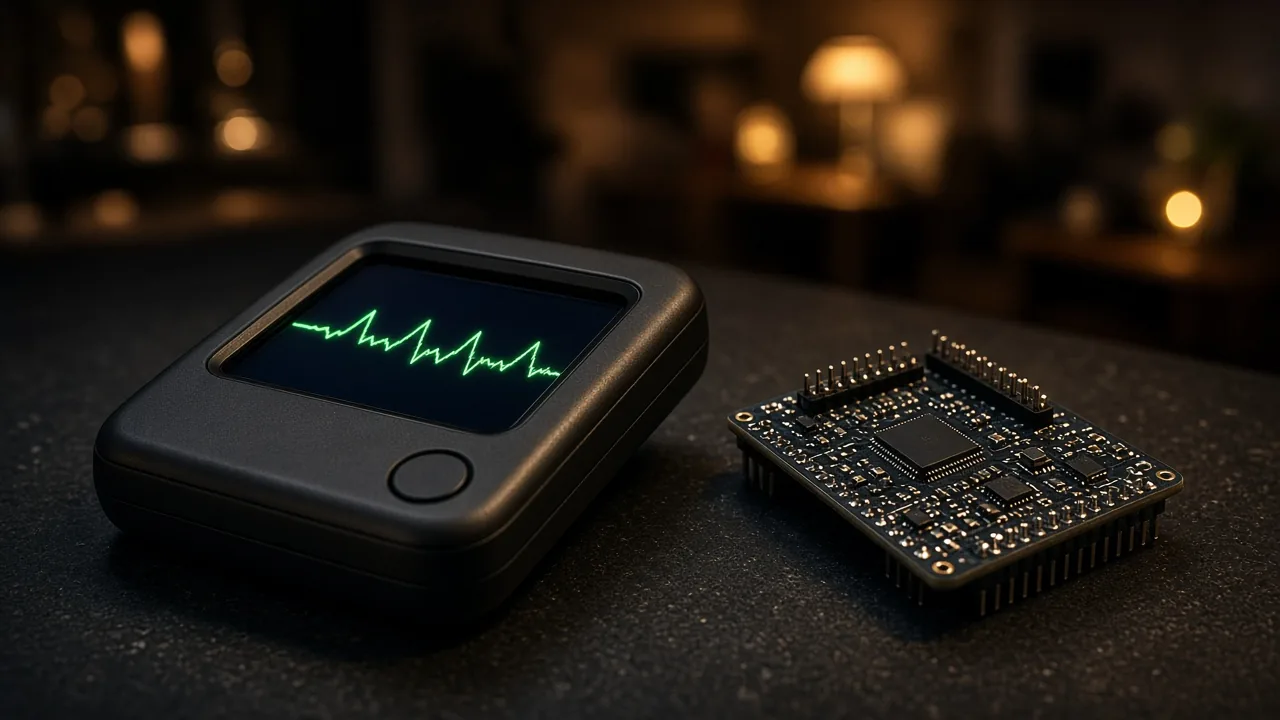
This Palm-Sized AI Roasts You, Checks the Weather and Turns On Your Lights — and Its Brain Isn't Even in Your Pocket
A cheeky assistant small enough to hold between two fingers answered questions, controlled smart lights and insisted it was "compact," not small. Here is how a cheap microcontroller pulls that off, what open-source firmware makes it possible, and what to know before you build one.
Contents
- The stake
- The demo: a tiny assistant with attitude
- The big trick: the brain lives elsewhere
- What is inside a device like this
- The software stack, step by step
- How it controls your lights
- Where the personality comes from
- The open-source project behind thousands of builds
- How it compares with phones and smart speakers
- Design lessons from the demo
- Why this matters
- Build guide: what you would need
- Risks and counterpoints
- FAQ
- The bottom line
The stake
"You are so small," someone tells the gadget in their hand.
"Small?" it shoots back. "The correct word is compact. And don't let my size fool you. I've got a mind bigger than your entire city."
That exchange comes from a build of a tiny pocket AI assistant — a device small enough to pinch between two fingers that answers questions, tells jokes, plays music, controls smart-home devices, checks the weather and, on request, roasts you.
It looks like magic. It is actually a clever division of labor: a cheap, low-power chip in your hand doing the listening and talking, and a powerful AI somewhere on the internet doing the thinking.
That architecture is why tiny AI gadgets have exploded among makers. Here is how this kind of device works, what you can build today, and where it falls short.
The demo: a tiny assistant with attitude
The assistant in this build is nicknamed ESP — the same name as the ESP32 chip family that powers most gadgets like it. Here is everything it does in its showcase:
- Wake and greet. "Hi, ESP." It responds and lists its skills: answering questions, jokes, music, smart-home control, weather "and even roast you a little."
- Smart-home state awareness. Asked to turn on the aquarium light, it replies that the light is already on — it knows the device's state rather than blindly sending a command.
- Multi-device action. Asked to turn on the studio light, it confirms that both the studio light and the fish-tank light are now on, and adds that the studio is well-lit.
- Personality under pressure. Told it is small, it insists on "compact" and brags about its mind.
- Volume control. Told to set volume to 100%, it does — and suggests warning the neighbors.
- Self-description. Asked who it is, it calls itself a tiny, cheeky pocket AI companion that can talk, listen and answer questions, but has no arms or legs, "so no dancing for me."
- Live data. Asked whether it will rain in New York today, it answers that it is clear at 19°C, no rain, "perfect weather."
- Sign-off. Asked to say goodbye, it says, "Bye, everyone. Talk soon."
None of those answers were complicated. What makes them impressive is the package: a device the size of a keychain doing real-time voice conversation, tool use and smart-home control.
The big trick: the brain lives elsewhere
A large language model — the kind that writes jokes and understands "turn on the studio light" — needs gigabytes of memory and serious processing power. A thumb-sized microcontroller has a tiny fraction of that.
So the device does not run the AI itself. Instead:
- The device handles the wake word, records your voice, streams audio, plays back responses and drives any screen or LEDs.
- A server turns speech into text, sends it to a language model, runs any tools (weather, smart home), and turns the reply back into speech.
- The network connects them, usually over Wi-Fi.
Think of the gadget as a walkie-talkie to a very smart friend. The friend is in the cloud; the walkie-talkie is in your hand.
That design is what makes these devices cheap, small and long-lasting on battery. It is also why they stop being smart the moment Wi-Fi drops.
What is inside a device like this
Most maker-built pocket assistants share a similar parts list:
- A microcontroller with Wi-Fi, commonly from Espressif's ESP32 family. Variants such as the ESP32-S3 are popular for voice projects.
- A digital microphone to capture speech.
- A small amplifier and speaker for replies.
- A tiny display (OLED or LCD) for expressions or text — optional, but it adds charm.
- A battery and USB-C charging circuit for portability.
- A button for push-to-talk, as an alternative to a wake word.
Typical open-source guides pair an ESP32-S3 module with an I2S microphone and an I2S amplifier, plus a small OLED and a battery. Microcontroller-class parts cost far less than a phone or smart speaker, though the total varies widely by board, screen, battery and region.
The "satisfying" part of builds like this is the assembly: soldering the parts into a case barely bigger than the board itself.
The software stack, step by step
Here is what happens between "Will it rain in New York today?" and "Perfect weather":
- Wake word. The chip listens locally for a trigger phrase. Projects use on-device speech libraries to do this offline, so nothing streams until you call it.
- Capture and compress. The device records your request and compresses it, often with the efficient Opus audio codec, and streams it to a server over WebSocket or MQTT.
- Speech recognition. The server converts audio to text.
- Language model. The text, plus a personality prompt, goes to an LLM.
- Tool calls. The model recognizes it needs live weather, calls a weather tool, and gets back "clear, 19°C."
- Response. The model writes a reply in character.
- Text to speech. The reply becomes audio.
- Playback. The device streams and plays it, maybe with a matching face on the screen.
Newer setups can also use realtime end-to-end voice models, which take audio in and send audio out directly. On hardware with echo cancellation, that enables full-duplex conversation: you can interrupt it mid-sentence, like a phone call.
How it controls your lights
The smart-home part of the demo is where things get interesting.
Leading open-source firmware for these devices uses the Model Context Protocol (MCP) — an open standard for letting AI models discover and use tools. It works on two levels:
- Device-side MCP exposes the gadget's own hardware as tools: its speaker volume, LEDs, servos, general-purpose pins.
- Cloud-side MCP extends the model with outside abilities: smart-home control, operating a PC, knowledge search, email and more.
So when you say "set volume to 100%," the model calls the device's volume tool. When you say "turn on the studio light," it calls a smart-home tool that talks to your lights.
That also explains the clever moment in the demo. When asked to turn on the aquarium light, the assistant said it was already on. That means the tool reported the device's current state, and the model used it. Small detail, big difference in how natural it feels.
Where the personality comes from
The roast-ready, "compact, not small" attitude is not built into the chip. It comes from the system prompt — the instructions given to the language model on the server.
A personality prompt for a device like this might define:
- A name and identity ("a tiny, cheeky pocket companion").
- A tone (playful, a little sarcastic).
- Limits (no arms or legs, so no dancing — a running joke).
- Skills to mention when asked what it can do.
Change the prompt and the same hardware becomes a calm study buddy, a kids' storyteller or a no-nonsense home controller. One open-source project even lets you customize wake words, fonts, emojis and chat backgrounds through a web editor.
The open-source project behind thousands of builds
If you want to build something like this today, the most popular starting point is XiaoZhi (xiaozhi-esp32), an open-source chatbot firmware described by its authors as "MCP-based." Its feature list is a good map of what tiny assistants can now do:
- Networking: Wi-Fi, wired Ethernet, USB networking and some 4G modules, with switching between Wi-Fi and 4G on supported boards.
- Offline wake word using Espressif's speech-recognition library, with customizable wake words.
- Two transports: WebSocket, or MQTT plus UDP.
- Opus audio streaming with classic speech-to-text → LLM → text-to-speech pipelines, plus realtime voice models.
- Speaker recognition to identify who is talking.
- Displays with emoji expressions, plus camera input on supported boards.
- Battery display and power management.
- 39 interface languages.
- Chip support across ESP32, ESP32-C3, C5, C6, S3 and P4.
- Board support spanning well over a hundred board directories, from development kits to pendants and even a low-cost robot dog.
By default, its firmware connects to the project's own server, where personal users can register and use a realtime model from Alibaba's Qwen family for free, according to the project. For more control, related open-source projects let you host the server on your own computer and point it at the models you choose.
How it compares with phones and smart speakers
Versus a phone: your phone can run assistants too, but it is a distraction machine. A dedicated gadget does one thing, is always ready, and does not tempt you into scrolling.
Versus a smart speaker: speakers are bigger and tied to one ecosystem. A DIY pocket assistant is portable, customizable and can use any model or personality you want.
Versus fully local AI: devices like a Raspberry Pi can run small language models on-device for privacy, at the cost of size, power and intelligence. A microcontroller assistant trades privacy for size and smarts by leaning on the cloud.
Design lessons from the demo
The showcase is short, but it quietly demonstrates several design choices that separate a delightful assistant from an annoying one.
1. Know the state before acting. "Yep, the aquarium light is already on" is better than silently re-sending a command. It proves the assistant understands the world, not just the words.
2. Confirm what changed. "The studio light and fish tank light have both been turned on" tells you exactly what happened. When an AI controls physical things, clear confirmations prevent confusion.
3. Add context, not just compliance. "The studio is now well-lit." "You might want to warn your neighbors." A short, relevant aside makes the device feel attentive.
4. Be honest about limits. "I don't have arms or legs, so no dancing for me" is a joke, but it also sets expectations about what the device can and cannot do.
5. Keep replies short. Every answer in the demo is one to three sentences. On a tiny speaker, long monologues are painful.
6. Personality as a feature. The "compact, not small" comeback is the moment people remember. Humor gives a small object a big presence — as long as it stays friendly.
7. Latency is everything. A voice assistant lives or dies by how fast it replies. Efficient audio codecs, streaming transports and realtime voice models all exist to shave delay.
If you build your own, write these rules into the personality prompt and the tool design. The hardware is the easy part; the conversation design is what makes people keep using it.
Why this matters
AI hardware is getting absurdly cheap. The expensive part — the model — is rented, not owned. That makes AI gadgets accessible to hobbyists, students and small companies.
Voice is becoming the interface. Talking to a small object is natural. These builds hint at a future of many tiny AI devices instead of one phone.
Open protocols win. MCP lets an inexpensive microcontroller control lights, look things up and operate other software without custom integration for each task.
Personality is a product. The same hardware feels completely different depending on its prompt. Character design is becoming part of hardware design.
Build guide: what you would need
A realistic path for a first build:
- Pick a supported board. Start with a development board already listed by an open-source firmware project, ideally with a built-in mic, speaker and screen.
- Flash beginner firmware. Many projects offer a prebuilt image so you do not need a full development environment.
- Connect to Wi-Fi through the device's setup hotspot or Bluetooth provisioning.
- Configure the model and personality in the server console.
- Add tools through MCP: weather, smart-home control, music.
- Go custom later: design a case, choose a battery, solder your own parts, or self-host the server.
Tips:
- Use push-to-talk if wake-word detection struggles in noisy rooms.
- Expect to tune microphone gain and speaker volume.
- Linux is generally smoother than Windows for compiling the firmware, according to the project.
- Keep firmware updated; these projects change fast and now require recent versions of Espressif's SDK.
Risks and counterpoints
- Privacy. Your voice is sent to a server. If you use a public or third-party server, you are trusting someone with recordings from your home.
- Smart-home security. An AI that can control lights can potentially control locks or appliances. Limit what tools it can access.
- Dependency. No internet, no intelligence. A server shutdown or policy change can brick the experience.
- Accuracy. LLMs can be confidently wrong, including about live data. Check anything important.
- Battery and heat. Streaming audio over Wi-Fi drains small batteries fast.
- Roasts can land wrong. A cheeky personality is fun until it is aimed at a kid or a guest. Tune the prompt.
A quick security checklist
Before you connect a tiny assistant to your home, run through these:
- Separate network. Put IoT gadgets on a guest or IoT Wi-Fi network, away from your laptops and phones.
- Least privilege. Expose only the tools it needs. Lights and music, yes; door locks and garage doors, probably not.
- Know your server. Decide whether you trust a hosted server with your audio, or self-host so recordings stay on your own machine.
- Update firmware. Open-source projects patch protocol and security issues regularly.
- Use push-to-talk in sensitive rooms so the microphone only listens when you press a button.
- Review logs if your server keeps them, and delete what you do not need.
Ten minutes of setup here prevents most of the realistic problems with always-listening gadgets.
FAQ
Does the AI run on the tiny chip?
No. The chip handles wake words, audio and controls. Speech recognition, the language model and speech synthesis run on a server.
Can it work without internet?
Wake-word detection can run offline, but answering questions and controlling cloud services needs a connection, unless you host your own server on your local network.
How does it control smart-home devices?
Through tools exposed to the language model, commonly via the Model Context Protocol, which can report device state ("already on") and send commands.
Is this different from a Raspberry Pi AI companion?
Yes. A Raspberry Pi can run small models locally. A microcontroller assistant is smaller and cheaper but relies on a remote model.
Is it hard to build?
With a supported board and prebuilt firmware, it can take an afternoon. Custom hardware and self-hosted servers take more skill.
The bottom line
A palm-sized gadget that says it has "a mind bigger than your entire city" is technically right — as long as its Wi-Fi is working. The mind is on a server. The gadget is the voice, the ears and the personality's delivery system.
That split is exactly why tiny AI assistants are booming: cheap chips, open firmware, open tool protocols and rented intelligence add up to devices anyone can build. Just remember what you are carrying around: a microphone connected to someone's AI. Choose that someone carefully.
Sources
- GitHub, xiaozhi-esp32: An MCP-based chatbot
- Model Context Protocol, Official documentation
- Espressif, ESP-SR speech recognition framework

More stories you'll want to read
Open infra12 minAt Davos, Google, Meta and Cambridge argued that models are the tip of the iceberg — frameworks, training stacks, compilers and chips decide who can actually innovate.Read now →
 From scratch12 minBuilding a GPT with only NumPy sounds like a flex. The educational punchline is meaner: without pretraining data, your beautiful architecture just emits haunted word salad.Read now →
 From scratch12 minFrom-scratch AI projects look like ego. Done right, they are the fastest way to kill magical thinking about models — one matrix multiply at a time.Read now →
 Office cloned11 minWordCraft, GridCraft and DeckCraft look strikingly like Microsoft's apps, open real Office files, run offline and cost nothing. They were built with AI right after the same developer cloned Adobe's suite. Here is what they can do, why Microsoft stayed quiet, and what it means when software becomes cheap to copy.Read now →
 Genie 411 minDescribe a scene and seconds later you are walking through it, hearing birds, steering a character and arguing with people inside it. Google DeepMind's Genie 4 adds native audio, interactive dialogue and an AI director that keeps the world coherent. Here is what it does, how it works and what it still cannot do.Read now →
 AI plays D&D13 minA movie-trailer tree, a succubus who turns into a frog when hit, and a furious Napoleon were given AI brains and sent through six D&D scenarios toward a final boss played by a live audience. The chaos was hilarious. The lessons about AI characters are serious.Read now →